

How to Use SE Ranking for Local Keyword Tracking
If your business depends on customers in a specific city, service area, or neighborhood, tracking national keyword positions is not enough.
A business can rank well for a keyword in one location and barely appear a few miles away.
That is why local keyword tracking matters.
SE Ranking is particularly useful for this because it can track rankings by city, ZIP/postal code, device, language, and search engine. It also includes dedicated local ranking tools for monitoring Google Maps and Google Business Profile visibility.
In this guide, I’ll show you how to set up local keyword tracking in SE Ranking, what to monitor, and how to interpret the data.
What Is Local Keyword Tracking?
Local keyword tracking measures where your website or business appears in search results from a specific geographic location.
For example, instead of simply tracking:
plumber
you might track how your website ranks for that keyword from:
- Austin, Texas
- Downtown Austin
- ZIP code 78701
- nearby suburbs
- different mobile and desktop locations
This matters because Google can show different results depending on location, device, language, and other search context.
SE Ranking’s Rank Tracker supports multiple geographic locations and devices, while its Local Marketing tools can track positions in Google Maps from individual locations or grids of tracking points.
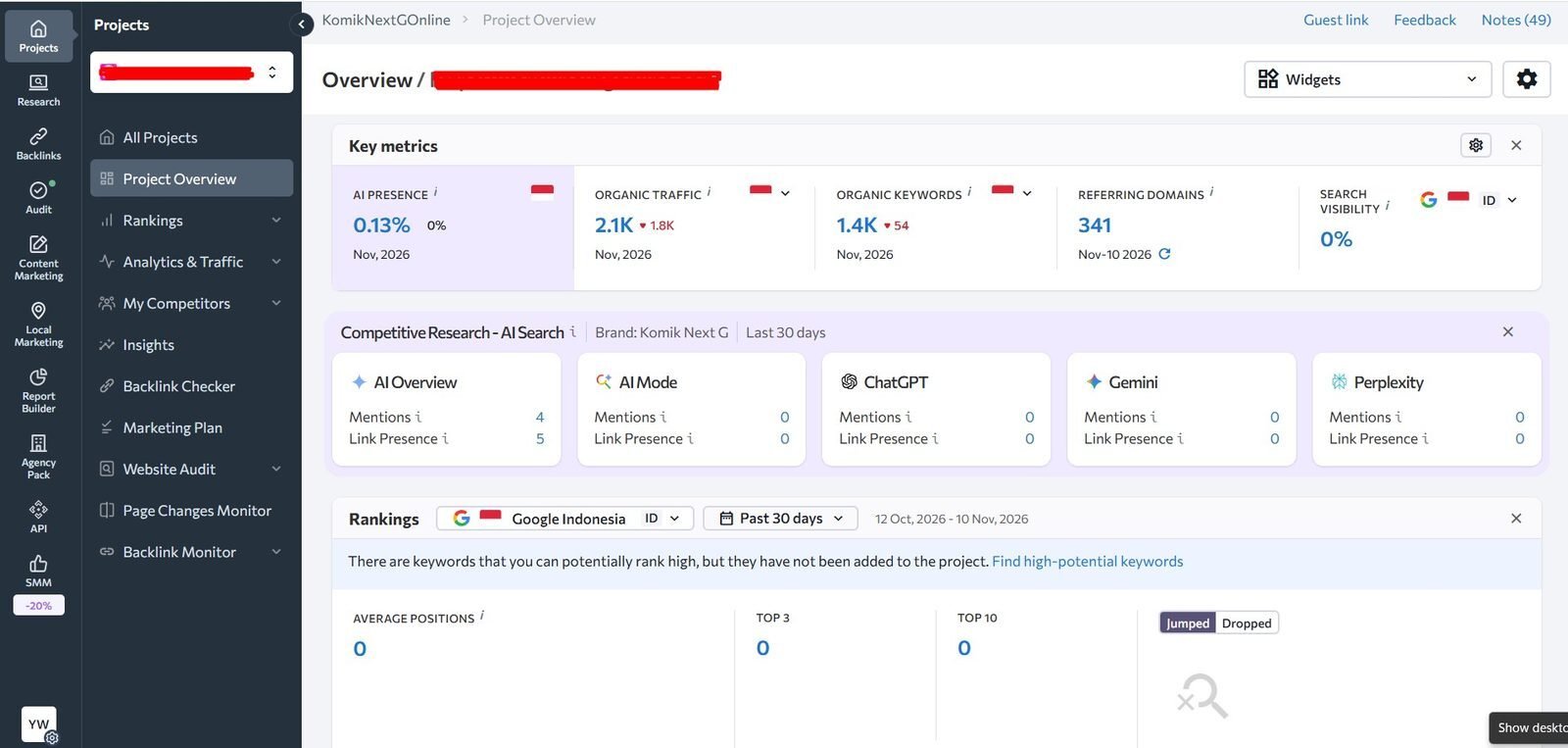
Step 1: Create or Open an SE Ranking Project
Start by logging in to SE Ranking and opening the website you want to track.
SE Ranking organizes rank tracking around projects, with each project connected to a website.
If you are adding a new website, you can configure the search engine and location during project setup.
For an existing project, open:
Rankings → Settings → Project Settings → Search Engines
From here, you can add or change the search engines and locations used for rank tracking.
Step 2: Add Your Local Search Location
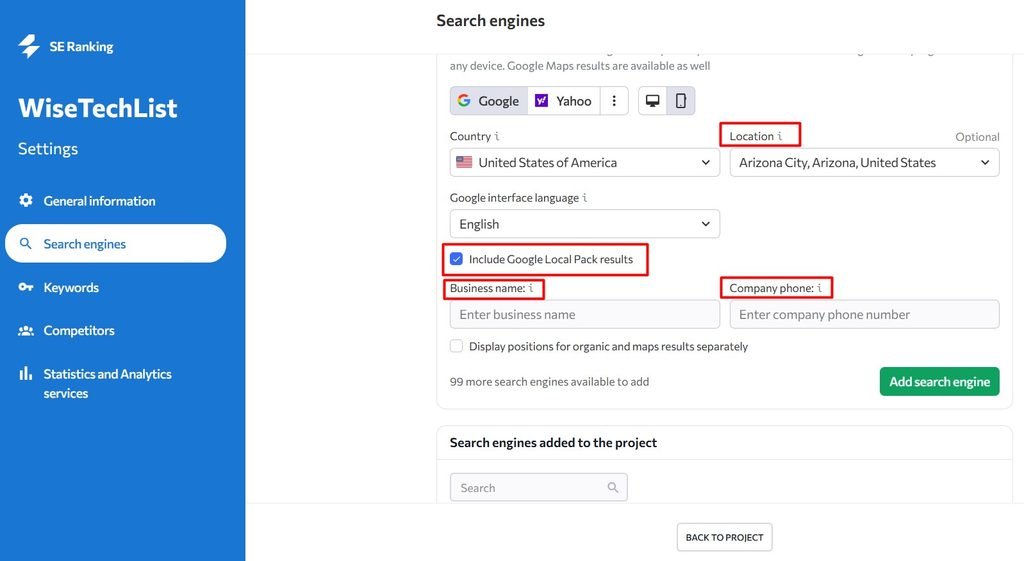
The most important part of local rank tracking is choosing the correct location.
SE Ranking lets you specify locations at a much more granular level than simply selecting a country.
You can track rankings using a:
- city
- ZIP or postal code
- region
- specific geographic area
According to SE Ranking’s documentation, you can configure location tracking from the project’s Search Engines settings.
For a local business, avoid tracking only at the country level.
For example, a dentist in Chicago will learn much more from tracking:
Chicago, Illinois
than from tracking:
United States
The local SERP is the result that actually represents what nearby customers are likely to see.
Step 3: Choose Desktop and Mobile Tracking
Local search behavior can differ between desktop and mobile.
That matters especially for businesses such as:
- restaurants
- dentists
- plumbers
- repair services
- local stores
- salons
- home-service companies
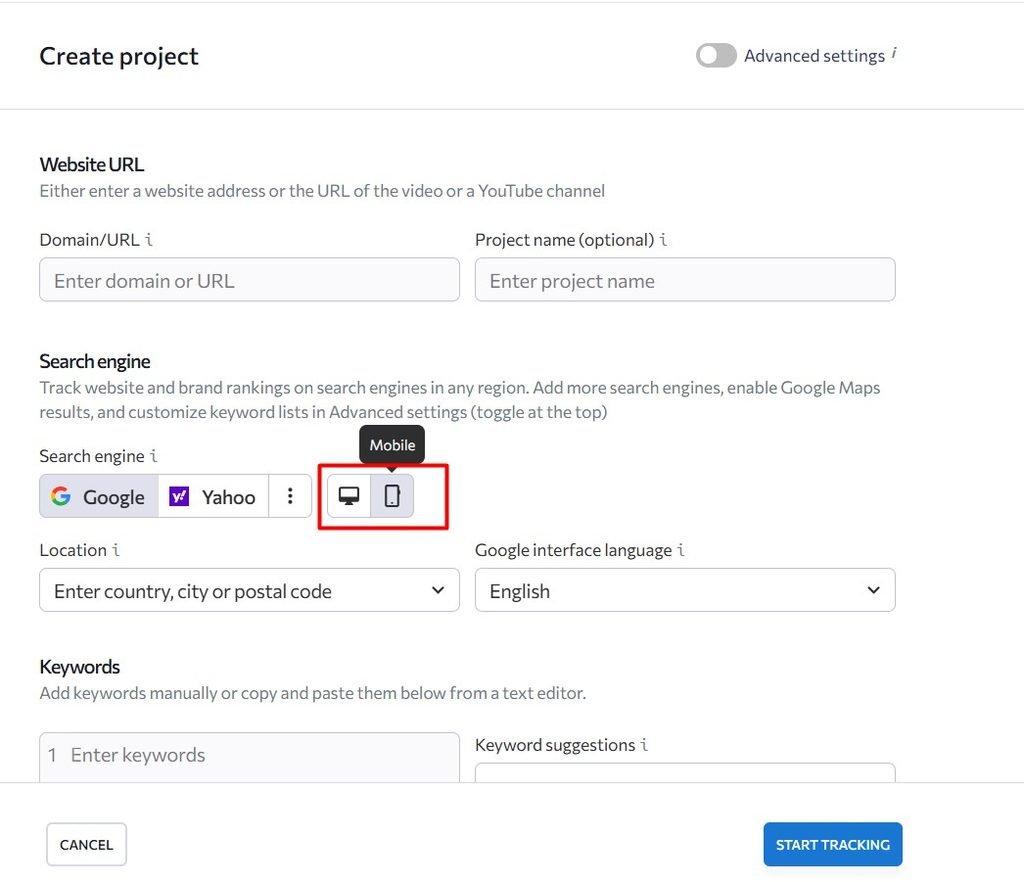
SE Ranking can track rankings across different search environments, including Google and Google Mobile.
If mobile search is important to your business, track both.
This gives you a clearer picture of whether the same keyword performs differently across devices.
Most of website visitors comes from mobile devices, however for comparison website most visitors coming from Desktop users. So it depend what niche is the website.
Step 4: Add Local Keywords
Next, add the keywords that matter to your business.
Avoid filling the tracker with only broad, generic keywords.
A useful local keyword set normally includes several types.
Service keywords
Examples:
- emergency plumber
- family dentist
- wedding photographer
- roof repair
Service + location keywords
Examples:
- plumber in Austin
- Chicago family dentist
- Miami wedding photographer
- Denver roof repair
High-intent local keywords
Examples:
- plumber near me
- dentist open Saturday
- emergency AC repair near me
You do not need hundreds of keywords immediately.
Start with keywords that map directly to important products, services, and customer actions.
Once the project has enough data, you can expand the list based on search demand and actual ranking opportunities.
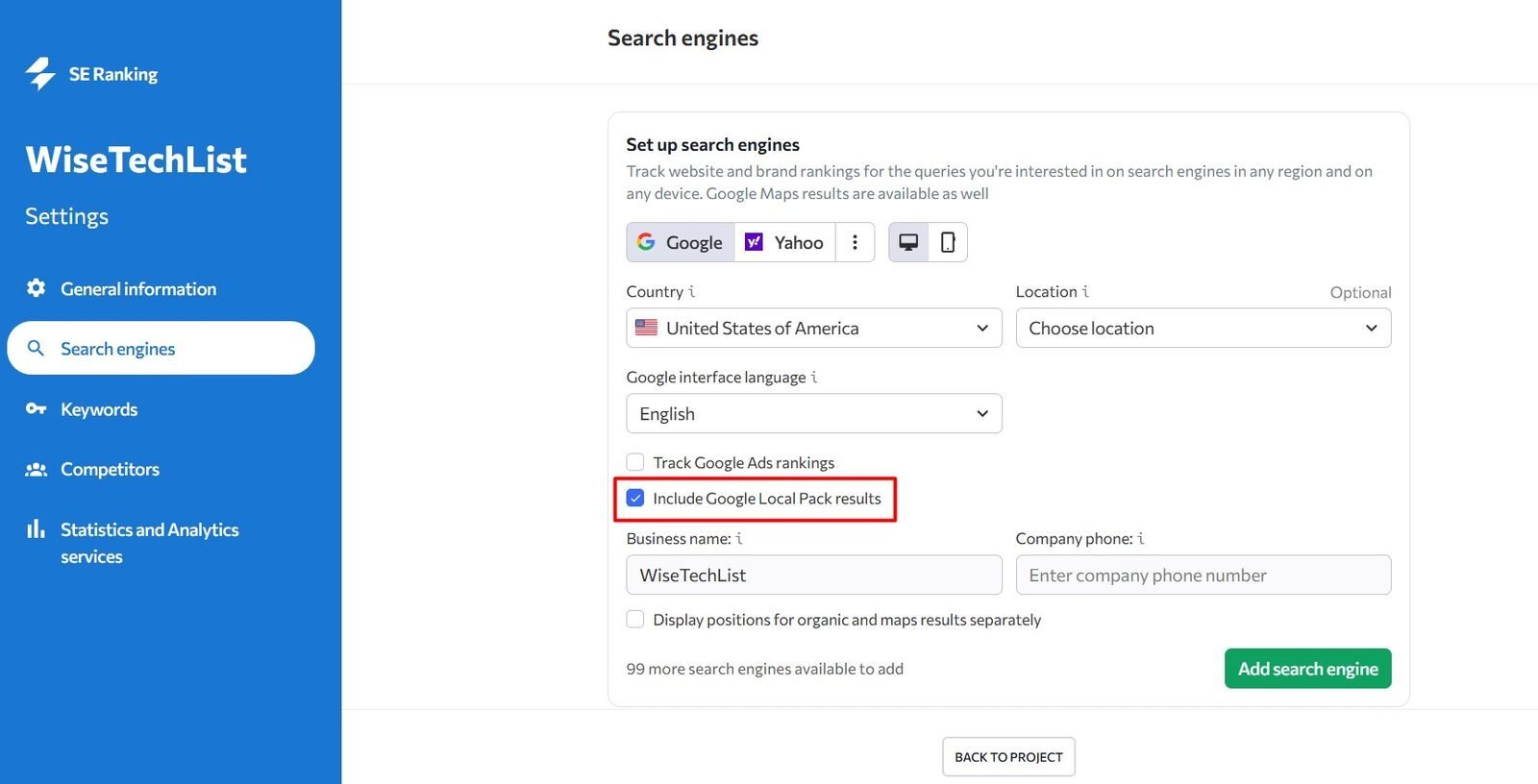
Step 5: Include Google Local Pack Tracking
If your business has a Google Business Profile, traditional organic rankings are only part of the picture.
Google may show a Local Pack or Maps results above standard organic listings.
SE Ranking allows Local Pack results to be included in tracking by enabling the relevant option in the search engine configuration. The setup can also use business information such as the company name and phone number.
This is particularly useful for businesses where Google Maps drives calls, directions, and visits.
Using SE Ranking Local Marketing for Google Maps Tracking
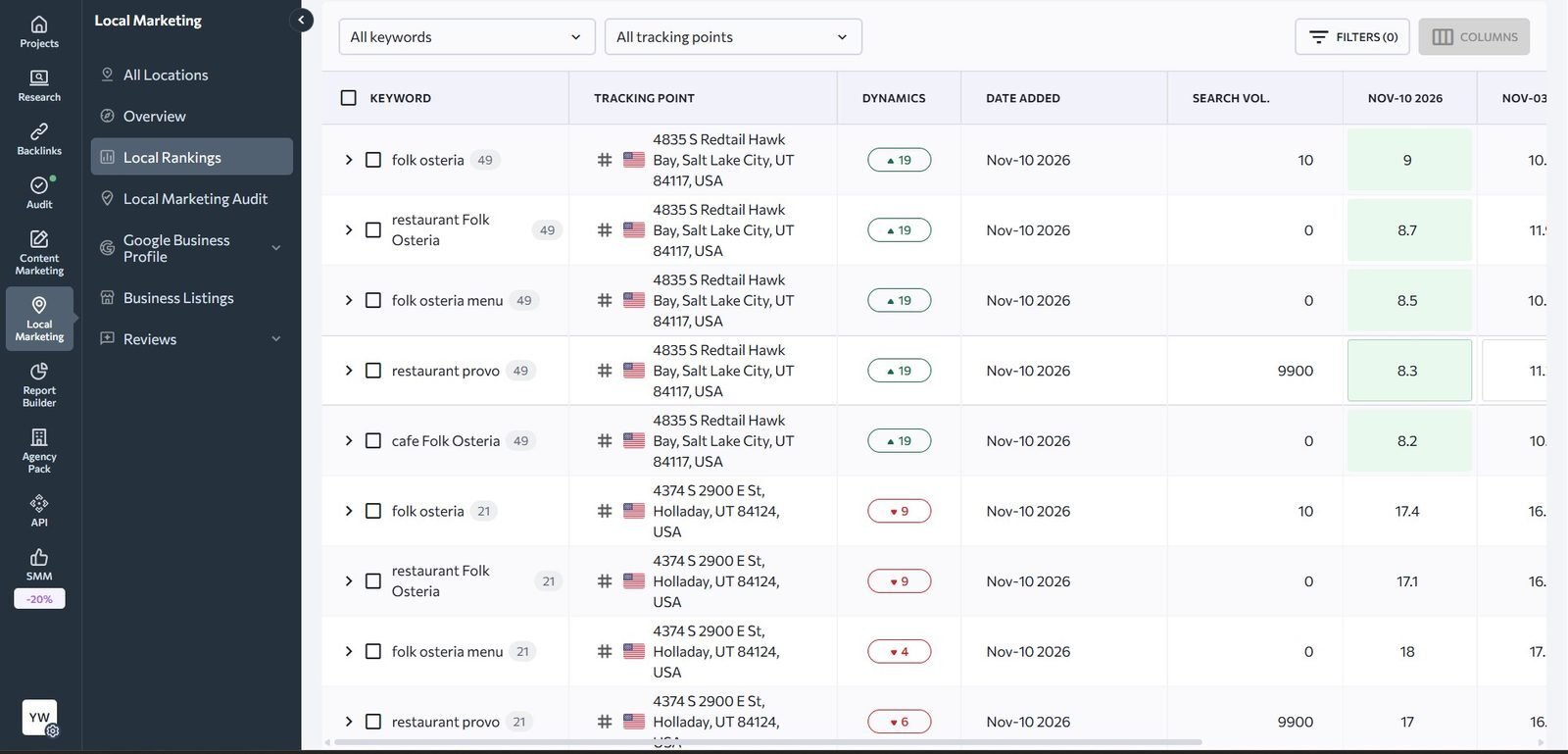
Standard Rank Tracker is useful for monitoring organic positions from a selected city or ZIP code.
But for businesses where Maps visibility is critical, SE Ranking also has a dedicated Local Rankings section.
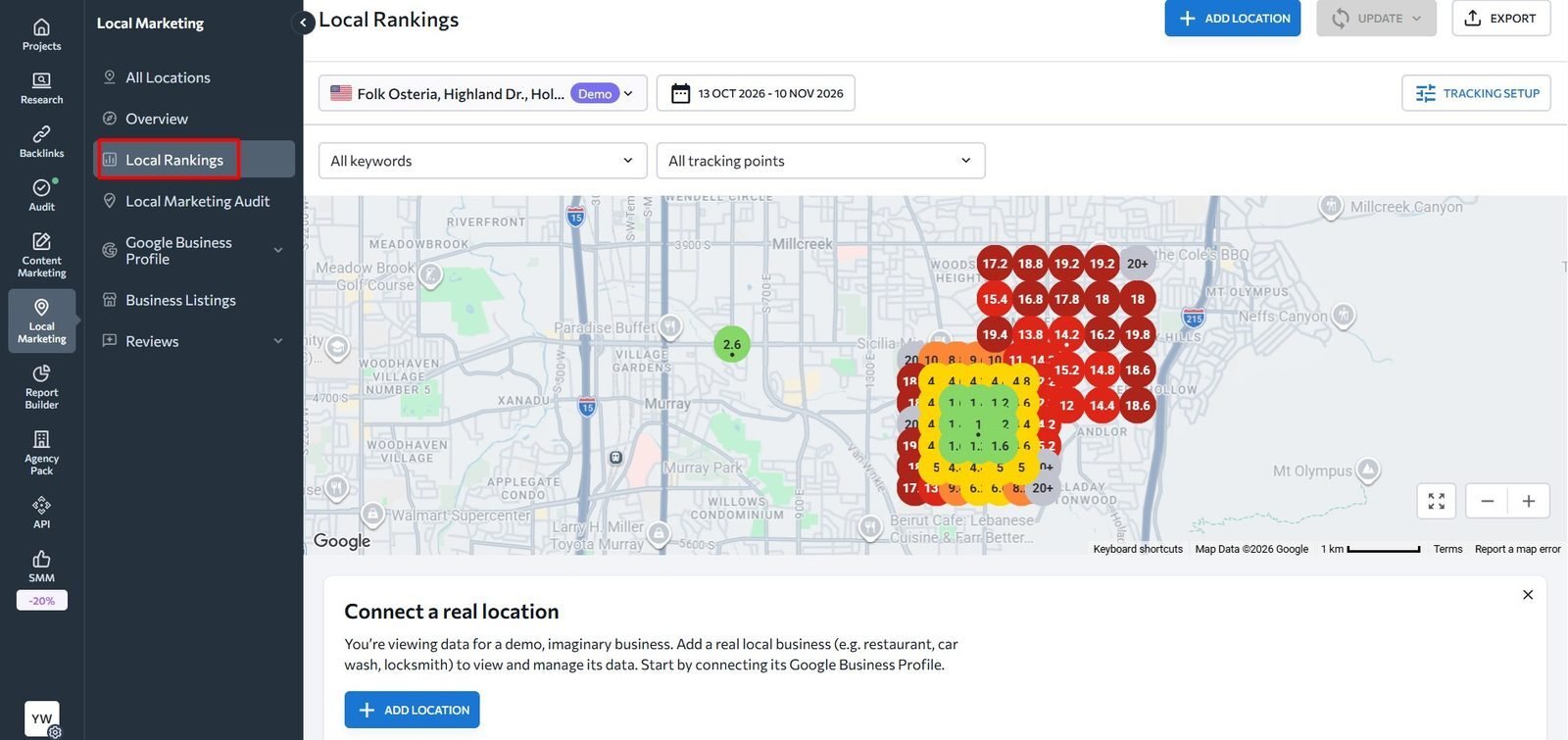
This tool can track Google Maps positions from specific points on a map.
You can define tracking points such as:
- a city
- neighborhood
- street
- exact address
- multiple locations around a service area
SE Ranking then checks how your Google Business Profile ranks from those locations.
Step 6: Add Tracking Points
Open SE Ranking’s Local Rankings tool and select the business location you want to analyze.
Then open:
Tracking Setup
You can add locations where you want the rankings to be checked.
This makes it possible to answer questions such as:
Do we rank well downtown but poorly in the suburbs?
or:
How far from our business location does our Google Maps visibility remain strong?
That is much more useful for local SEO than relying on a single city-wide ranking.
Step 7: Use Grid Rank Tracking
For a more detailed view, SE Ranking can create a grid of tracking points around a location.
Its Local & Map Rank Tracker supports grids from 3×3 up to 15×15, with configurable distance between points.
Instead of receiving one ranking position for an entire city, you can see how visibility changes across the map.
For example:
| Tracking Point | Keyword Position |
|---|---|
| Near business | #2 |
| 2 miles north | #4 |
| 3 miles east | #7 |
| 5 miles south | #12 |
This is useful because local search visibility usually does not stay constant across an entire city.
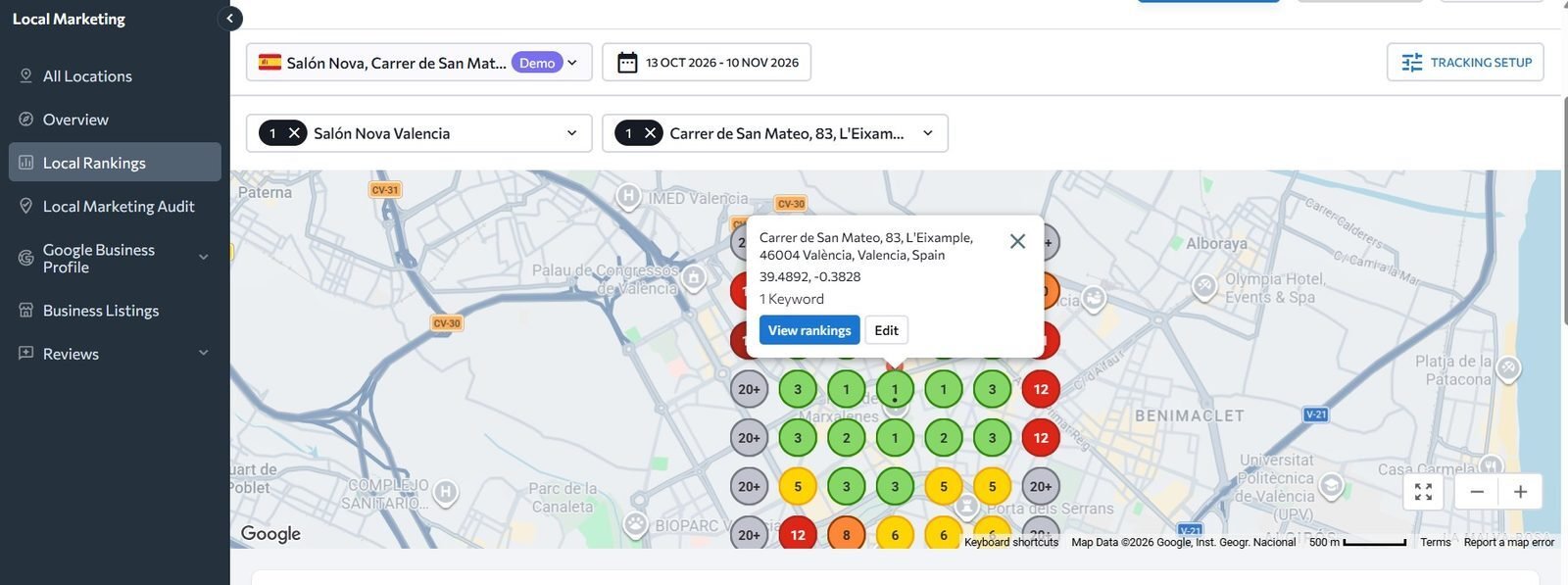
SE Ranking uses colors to make these grid results easier to interpret. Its documentation currently describes top-three positions in green, with progressively lower ranking ranges represented by other colors.
Step 8: Monitor Ranking Changes Over Time
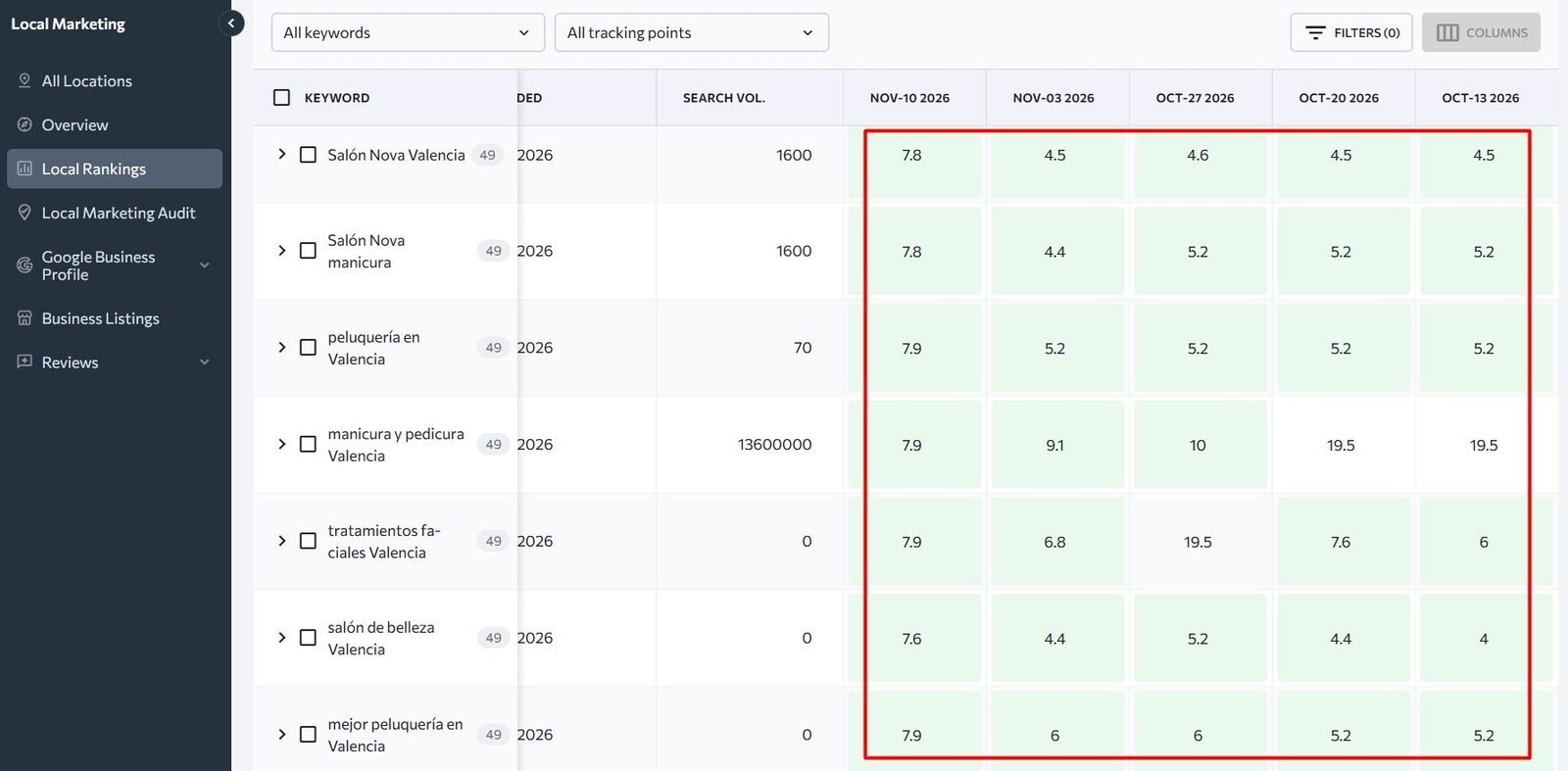
A single ranking check does not tell you much.
SEO rankings move.
Instead, look at how positions change over several days or weeks.
SE Ranking’s Rankings module includes historical position data, which makes it easier to identify:
- steady growth
- sudden ranking drops
- keywords entering the top 10
- keywords reaching the top 3
- location-specific visibility changes
SE Ranking itself recommends looking at ranking history rather than overreacting to small changes between individual checks, because normal Google SERP volatility can move results by a position or two.
Why SE Ranking May Show a Different Position Than Google
A common question is:
Why does SE Ranking show position #4 when I see position #2 in Google?
That does not necessarily mean the tracker is wrong.
Google search results can be affected by:
- your current location
- search history
- browser language
- Google account activity
- device
- personalization
SE Ranking recommends comparing results using the exact location configured in the project and a non-personalized browsing environment such as an incognito session.
Also remember that Google Search Console reports an average position, while a rank tracker records a position from a particular ranking check. Those numbers therefore should not be expected to match exactly.
A Simple Local Keyword Tracking Workflow
For a small business, you do not need to overcomplicate the process.
A practical workflow looks like this:
1. Track your main services
Start with around 10–20 commercially important keywords.
2. Add local versions
Include city names, neighborhoods, or relevant geographic modifiers.
3. Track desktop and mobile
Especially if customers frequently search from phones.
4. Monitor Google Local Pack
Important for businesses with a Google Business Profile.
5. Add Maps tracking points
Use several points across your actual service area.
6. Check trends, not individual fluctuations
Look for sustained movement over several days or weeks.
7. Investigate location gaps
If you rank #2 near your office but #15 three miles away, that tells you something useful about your local visibility.
Which Keywords Should You Prioritize?
Start with keywords that have clear business value.
A local accounting firm, for example, might track:
- small business accountant
- tax accountant
- accountant near me
- small business accountant Chicago
- bookkeeping service Chicago
- tax preparation Chicago
Do not choose keywords only because they have high search volume.
A lower-volume local query can be much more valuable if the person searching is ready to contact a business.
SE Ranking vs Semrush and Ahrefs for Rank Tracking
SE Ranking is particularly interesting when ongoing rank tracking is a large part of your SEO workflow.
In our broader comparison of Semrush vs Ahrefs vs SE Ranking, SE Ranking currently stands out for rank tracking capacity and multi-project monitoring, while Ahrefs is particularly strong for backlink and competitor research and Semrush offers a broader all-in-one marketing workflow.
If you are still deciding which platform better fits your workflow, read:
Semrush vs Ahrefs vs SE Ranking: Which SEO Tool Should You Choose in 2026?
For a local business that needs to monitor many keywords across several locations, SE Ranking’s local and map tracking features can be one of the strongest reasons to consider it.
Final Thoughts
Local SEO is highly location-dependent.
Checking a keyword manually from your own computer gives you only one version of the search results.
A proper local rank tracker gives you a more structured view of:
- where you rank
- where visibility drops
- how mobile and desktop results differ
- whether your Google Business Profile appears in Maps
- how rankings change across your service area
SE Ranking combines regular keyword tracking with location-specific settings, Google Local Pack monitoring, and grid-based Maps tracking.
For businesses that rely heavily on local search traffic, that makes rank tracking much more actionable than checking a few keywords manually in Google.