
Inspect a Website’s SEO in One Click
Check on-page SEO, link attributes, website technologies, and visible WordPress themes and plugins — directly in your browser.
Free to use · No account required · Page analysis runs locallyEverything you need for a quick website inspection
Get useful website signals from the current tab, without switching between multiple analysis tools.
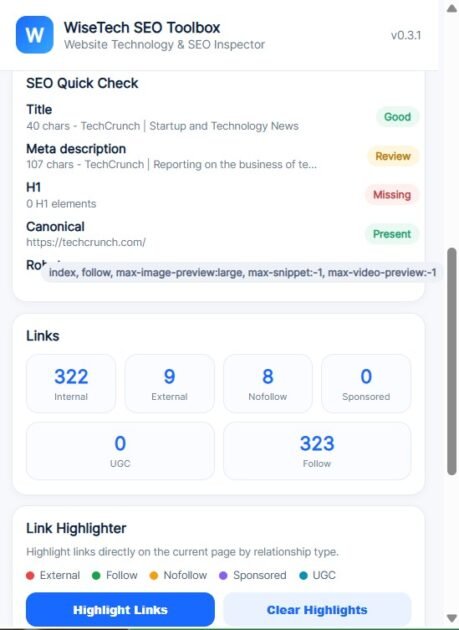
SEO Quick Check
Review the page title, meta description, H1, canonical URL and robots directive.
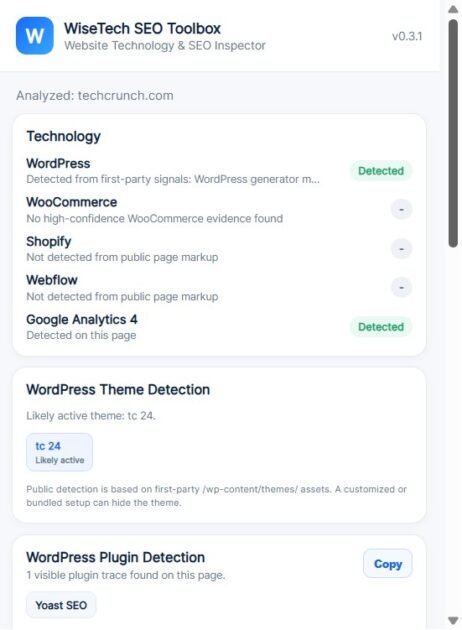
Website Technology
Spot publicly visible traces of WordPress, WooCommerce, Shopify, Webflow and GA4.
WordPress Detection
Inspect visible theme and plugin clues. On your own site, inspect theme or plugin information from the WordPress admin screens.
Link Inspector
Count internal, external, follow, nofollow, sponsored and UGC links.
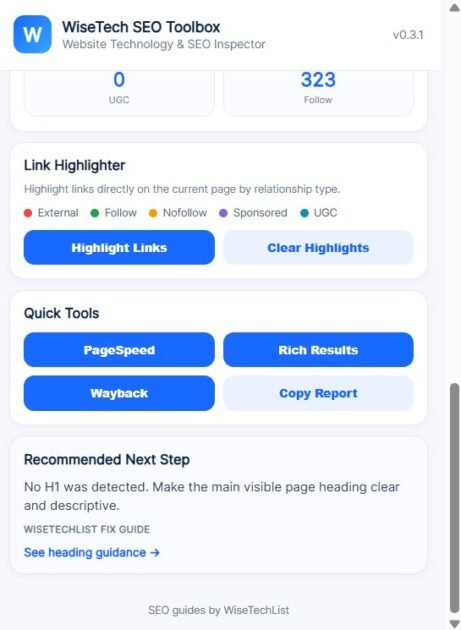
Link Highlighter
Highlight links on the current page to inspect their types and attributes visually.
Quick Tools
Open the current URL in PageSpeed Insights, Google Rich Results Test or Wayback Machine.
See WiseTech SEO Toolbox in action
Click any screenshot to view a larger preview. Close it using the × Close button, the dark background, or the Escape key.
Tip: replace SCREENSHOT_1_URL, SCREENSHOT_2_URL, and SCREENSHOT_3_URL with your uploaded Media Library image URLs.
How it works
Three simple steps to begin checking a webpage.
Install
Get the free extension from the Chrome Web Store or Microsoft Edge Add-ons.
Open a webpage
Visit a site you want to inspect and open WiseTech SEO Toolbox.
Review results
Inspect SEO signals, visible website technology and link attributes.
See more on a WordPress site you manage
On public pages, detection uses visible clues and may not find every theme or plugin. If you own the WordPress website, you can also open its dashboard to inspect more direct information.
- Appearance → Themes for locally available theme information.
- Plugins → Installed Plugins for active and inactive plugin information.
- No promise of complete detection from public pages.
Public website scan
WordPress admin inspection
Inspect information already visible to you in your own WordPress dashboard.
Built for quick checks, with privacy in mind
The extension analyzes the current page locally when invoked. It does not upload inspected page content, SEO values, WordPress plugin lists, theme information, or browsing history to WiseTechList.
View the recommended next steps guide →Frequently asked questions
Is WiseTech SEO Toolbox free?
Yes. The Chrome and Edge extensions are free to use and do not require an account.
Does this extension perform a complete technical SEO audit?
No. It provides quick checks of selected page elements. It does not replace a full crawl, performance audit or comprehensive technical SEO platform.
Can it detect every WordPress plugin?
No. Public detection relies on visible plugin traces. On sites you manage, use the WordPress Installed Plugins admin screen for a more direct local inventory.
What if a theme or plugin is not detected?
Caching, custom asset paths, bundling and hidden resources can prevent detection. Learn more in the Recommended Next Steps guide.
Does it work on protected browser pages?
Chrome and Edge restrict extensions on certain internal pages, such as chrome:// and edge://. Try a normal website page.
Ready to inspect a webpage?
Install WiseTech SEO Toolbox and run your first quick check today.
Developed by WiseTechListNote: This browser extension provides informational checks, not search ranking guarantees. Technology detection is evidence-based and may be incomplete.