

Notion vs ClickUp
Notion vs ClickUp: Which Should You Choose?
Notion and ClickUp share a free plan, have no free trial, and are both rated Medium difficulty. Both also describe AI agents that work from the content already in your workspace. What differs is what sits at the center. Notion starts from documents and databases, and ClickUp starts from tasks and projects. The choice depends on whether your team's main asset is shared knowledge or work in progress.
Choose based on how you work
Choose Notion if…
Choose Notion if your existing documents and databases should be the context for agent-assisted research and operational work.
View Notion details →Choose ClickUp if…
Choose ClickUp if the same platform should manage projects and run context-aware AI workflows around existing tasks and documents.
View ClickUp details →See the products side by side
Compare the actual interfaces to see how each tool approaches everyday work.
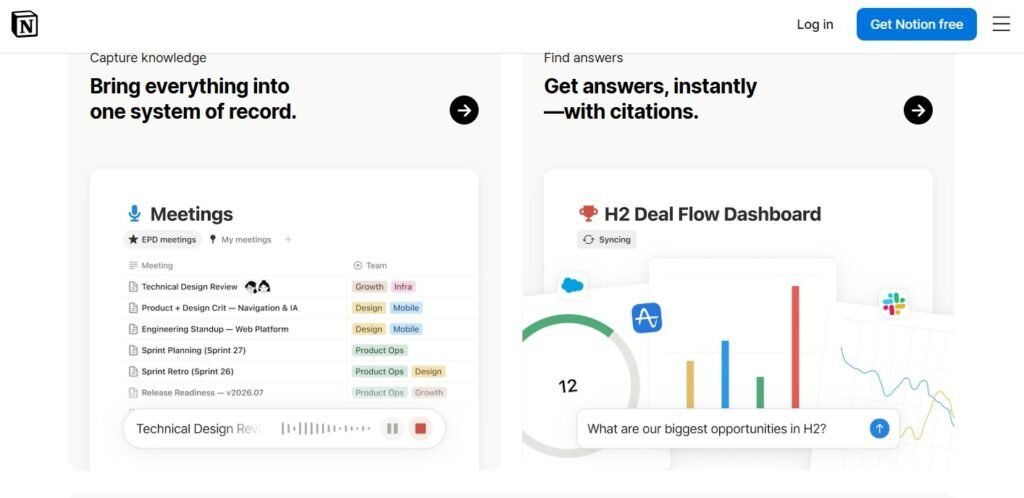
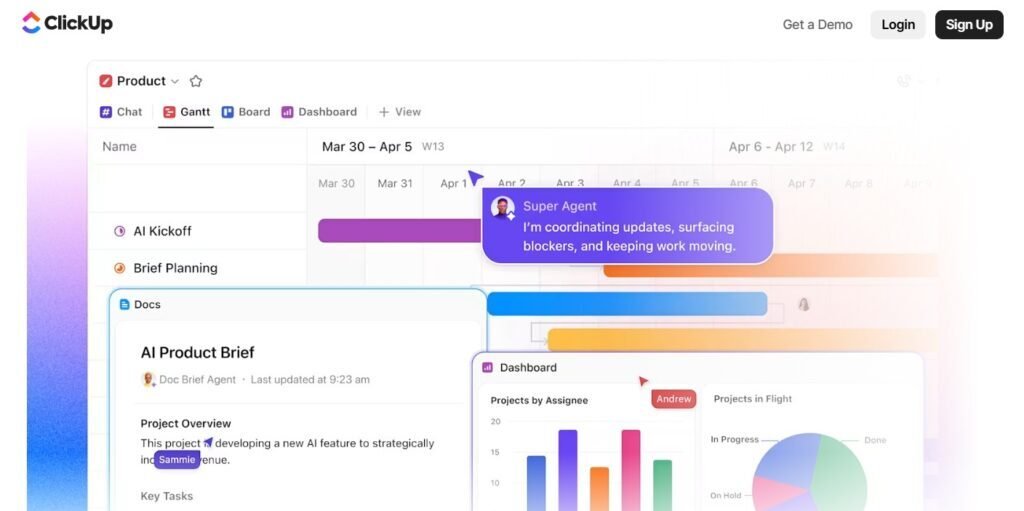
Notion vs ClickUp comparison
| Compare | Notion | ClickUp |
|---|---|---|
| Starting price | $10/member/mo billed annually | $7/user/mo billed annually |
| Free plan | Yes | Yes |
| Free trial | No | No |
| Difficulty | Medium | Medium |
| Best for | Teams needing a shared knowledge hub plus agents that can research, update workspace content, and create outputs using contextual data. | Project and operations teams that want AI agents working inside tasks, documents, and cross-functional workflows rather than a separate chat tool. |
| Key strength | Workspace knowledge and databases connected to Notion Agents, enterprise search, AI meeting notes, file creation, and selected computer/browser tasks. | Rich project context linked to Brain², multi-model access, Super Agents, and agent workflows with approval points. |
| Main limitation | Notion Agent capabilities and credits depend on subscription; long-running tasks still require permission controls and Notion workspace data needs good structure. | AI features are tier- and usage-dependent; workflow complexity, permissions, and credit models need management in addition to ordinary task setup. |
| Last checked | Nov 2026 | Nov 2026 |
Where each tool wins
Where Notion wins
- Team wiki and knowledge search are listed use cases, and ClickUp's list has neither.
- Docs and databases live together in one workspace, as the pros list puts it.
- Reusable workspace knowledge is named as a strength, which suits teams that keep a lot of written material.
- Database creation and updates are a listed use case, and ClickUp's list does not include them.
- Project automation is listed, so basic project work is possible without leaving the workspace.
Where ClickUp wins
- The entry price is lower: $7/user/mo, against $10/member/mo for Notion, both billed annually.
- Project and sprint management is a listed use case, and Notion's list says project automation instead.
- Interactive dashboards and prototypes are listed, and Notion's list does not include them.
- Automatic status reports are listed, which cuts down on manual updates.
- Team approvals are listed as a use case, with human approval workflows named in the pros list.
What can you use them for?
Notion
- Team wiki
- Knowledge search
- Notion Agents
- Database creation and updates
- AI meeting notes
- File and slide creation
- Cross-app research
- Project automation
ClickUp
- Project and sprint management
- Brain² research
- Super Agent workflows
- Document and slide generation
- Interactive dashboards and prototypes
- Automatic status reports
- Team approvals
Trade-offs to consider
Notion
What we like
- Docs and databases together
- Notion Agents
- Connected enterprise search
- AI meeting capture
- File and deliverable creation
- Reusable workspace knowledge
What to consider
- AI credits and plans vary
- Agent permissions need oversight
- Messy workspace data degrades results
- Not a rigid project management suite
- Workflows may require configuration
ClickUp
What we like
- Task and project depth
- Context-aware Brain²
- Super Agents
- Connected apps and MCP tools
- Interactive deliverables
- Human approval workflows
What to consider
- Learning curve
- AI entitlements and credits vary
- Agent output needs review
- Large workspaces can be complex
- More than basic teams may need
What decides it
Notion or ClickUp?
Notion
Choose it if: Choose Notion if your existing documents and databases should be the context for agent-assisted research and operational work.
Skip it if: Skip Notion if you only want simple personal notes or need a fully deterministic process engine without agent uncertainty or usage costs.
ClickUp
Choose it if: Choose ClickUp if the same platform should manage projects and run context-aware AI workflows around existing tasks and documents.
Skip it if: Skip ClickUp if you need only a lightweight task list or expect its most advanced AI agents to be included without additional usage terms.
Frequently asked questions
Which one is cheaper?
ClickUp, at $7/user/mo billed annually. Notion is listed at $10/member/mo billed annually. The page does not compare what each plan includes.
Do they have a free plan or trial?
Both have a free plan, and neither has a free trial.
Which one is better for a team wiki?
Notion lists a team wiki, knowledge search, and reusable workspace knowledge. ClickUp's use case list does not include them.
Which one is better for project management?
ClickUp lists project and sprint management and task and project depth. Notion's page says it is not a rigid project management suite.
Which one has dashboards and status reports?
ClickUp lists interactive dashboards and automatic status reports. Notion's use case list does not include them.
Can both create files and slides?
Yes. Notion lists file and slide creation, and ClickUp lists document and slide generation.
Do both have AI agents?
Yes. Notion lists Notion Agents, and ClickUp lists Super Agent workflows. Both depend on plan and credits.
Which one is easier to learn?
Both are rated Medium. ClickUp lists a learning curve, and Notion says workflows may require configuration.
Do the AI features cost extra?
Both pages say AI credits and plans vary. ClickUp also warns its most advanced agents may carry additional usage terms.
Who should skip each one?
Skip Notion if you only want simple personal notes or need a fully deterministic process engine. Skip ClickUp if you need only a lightweight task list or want advanced agents without extra usage terms.
Compare any two tools
Use the interactive comparison tool for combinations that do not have a permanent guide yet.