

WordPress.com vs Wix
WordPress.com vs Wix: Which Should You Choose?
WordPress.com and Wix both have a free plan, include hosting, and are rated Easy, so setup effort will not decide this one. What does is the kind of site you plan to run. WordPress.com is built around publishing, with blogging and content sites in its use case list. Wix is built around business pages, with landing pages and online booking in its list. Price also differs by a wide margin at the entry level.
Choose based on how you work
Choose WordPress.com if…
Choose WordPress.com if you want WordPress with managed hosting and prefer a simpler setup than running your own WordPress server.
View WordPress.com details →Choose Wix if…
Choose Wix if you want to launch and manage a professional website without handling hosting, updates, or much technical setup.
View Wix details →See the products side by side
Compare the actual interfaces to see how each tool approaches everyday work.
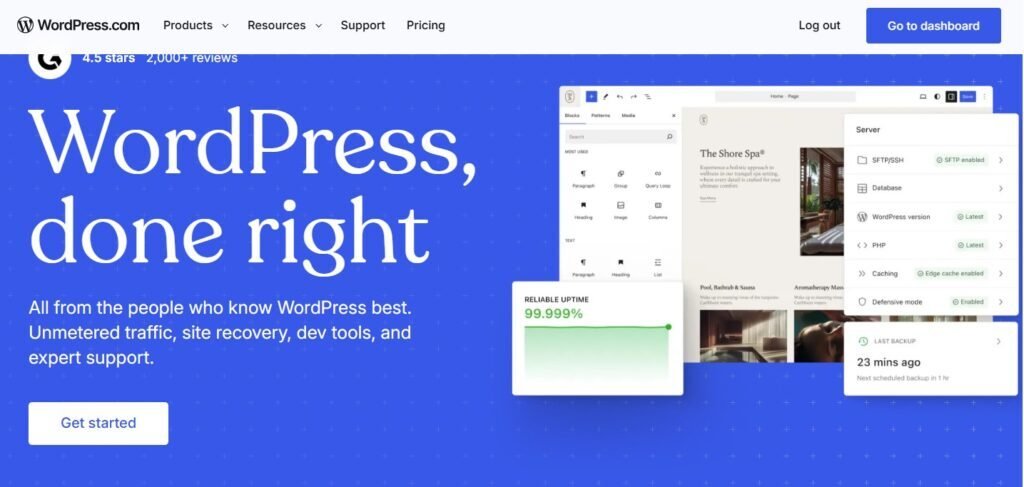

WordPress.com vs Wix comparison
| Compare | WordPress.com | Wix |
|---|---|---|
| Starting price | $4/mo billed annually | $17.77/mo billed yearly (US) |
| Free plan | Yes | Yes |
| Free trial | No | No |
| Difficulty | Easy | Easy |
| Best for | Managed WordPress websites for users who want WordPress flexibility without managing their own hosting stack. | Small businesses that want an all-in-one website builder without managing hosting or code. |
| Key strength | Combines WordPress publishing flexibility with managed hosting and a simpler maintenance experience. | Easy website creation with hosting, templates, business features, and AI tools in one platform. |
| Main limitation | Some customization and advanced capabilities depend on the selected paid plan. | Costs and platform dependence can increase as the site requires more advanced business features. |
| Last checked | Oct 2026 | Oct 2026 |
Where each tool wins
Where WordPress.com wins
- The entry price is lower: $4/mo billed annually, against $17.77/mo billed yearly (US) for Wix.
- Blogging and content publishing are listed use cases, and Wix's list has neither.
- Portfolio websites are a listed use case, and Wix's list does not include them.
- The WordPress ecosystem is named as a strength, which matters if you already know its themes and tools.
Where Wix wins
- Landing pages are a listed use case, and WordPress.com's list has none.
- Online booking is a listed use case, and WordPress.com's list has none.
- Service websites are named as a use case.
- The drag-and-drop editor suits people who want to build visually without code.
- A large template library gives you many starting points.
What can you use them for?
WordPress.com
- Business websites
- Blogging
- Content publishing
- Portfolio websites
- Ecommerce websites
Wix
- Small business websites
- Ecommerce
- Landing pages
- Service websites
- Online booking
Trade-offs to consider
WordPress.com
What we like
- Free plan available
- Managed hosting
- WordPress ecosystem
- Themes and publishing tools
- Can scale to business and ecommerce use
What to consider
- Some features depend on paid tiers
- Less infrastructure control than self-hosted WordPress
- Pricing rises for advanced business needs
Wix
What we like
- Free plan available
- Easy drag-and-drop editor
- Hosting included
- Large template library
- Built-in business and AI tools
What to consider
- Advanced plans become more expensive
- Less portable than open-source platforms
- Complex custom development can be limiting
What decides it
WordPress.com or Wix?
WordPress.com
Choose it if: Choose WordPress.com if you want WordPress with managed hosting and prefer a simpler setup than running your own WordPress server.
Skip it if: Skip it if you need complete server-level control, highly customized hosting infrastructure, or prefer assembling your own self-hosted WordPress stack.
Wix
Choose it if: Choose Wix if you want to launch and manage a professional website without handling hosting, updates, or much technical setup.
Skip it if: Skip it if you require maximum code-level flexibility, infrastructure control, or expect to migrate frequently between platforms.
Frequently asked questions
Which one is cheaper?
WordPress.com is listed at $4/mo billed annually and Wix at $17.77/mo billed yearly in the US. The page does not compare what each plan includes.
Do they have a free plan or trial?
Both have a free plan, and neither has a free trial.
Which one is easier to use?
Both are rated Easy. Wix lists an easy drag-and-drop editor.
Which one is better for blogging?
WordPress.com lists blogging and content publishing as use cases. Wix's list does not include them.
Which one is better for online booking?
Wix lists online booking as a use case. WordPress.com's list does not include it.
Which one is better for landing pages?
Wix lists landing pages as a use case. WordPress.com's list does not include them.
Can I run an online store on either one?
Yes. Both list ecommerce. WordPress.com says it can scale to business and ecommerce use, and Wix lists ecommerce directly.
Do both include hosting?
Yes. WordPress.com lists managed hosting, and Wix lists hosting included.
Can I move my site to another platform later?
Wix is described as less portable than open-source platforms. The page advises skipping it if you expect to migrate frequently.
Who should skip WordPress.com?
Skip it if you need complete server-level control, highly customized hosting infrastructure, or prefer assembling your own self-hosted WordPress stack.
Compare any two tools
Use the interactive comparison tool for combinations that do not have a permanent guide yet.